Sections and beat notes
Sections and beat notes
Your story’s structure divides it into sections: the beats of your beat sheet. Each section has a short description where you write what happens in that beat.
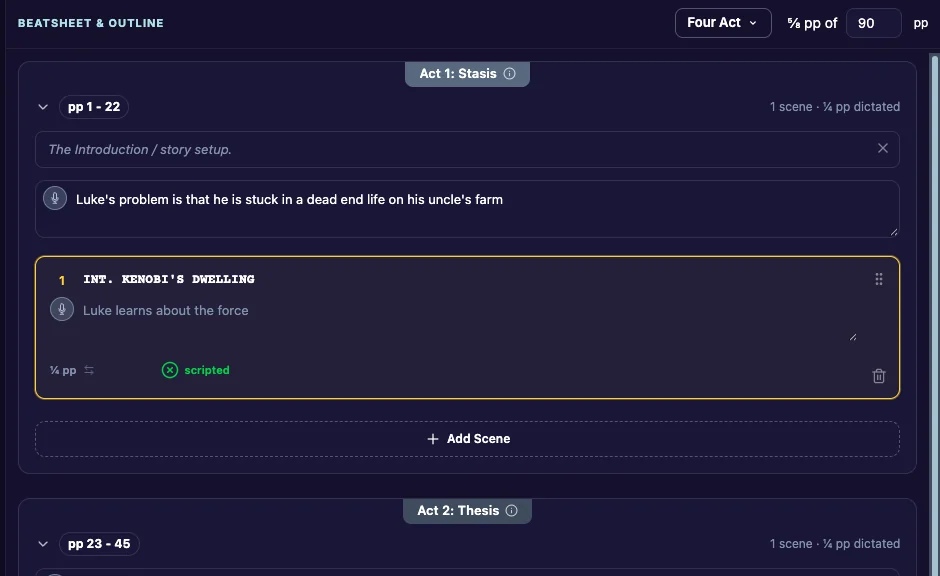
Beat Sheet and Outline
In the sidebar, under Story, choose how you see your story:
- Beat Sheet shows only the section descriptions: your beat sheet.
- Outline shows every section with its scenes.
A section header
Each section shows:
- its name, with (?) to read what the structure says should happen in this beat. Click it again to close it.
- its page range in your Page Target. See The beat sheet calculator.
- how many scenes it has and how much you have dictated.
- Show Scenes / Hide Scenes, to fold the section’s scenes away.
Write your beat notes
Click into a section’s description and type. The box shows the structure’s description of that beat as a hint until you write your own. Your notes save as you go.
Dictate your beat sheet
You don’t have to type. Click the small mic in a section’s description (Speak this beat) and say what happens. Your words appear in the box. Click the mic again to stop.
To keep your beat sheet dictation off the cloud, see Data security.
Free Form sections
With the Free Form structure, you name your own sections and can add, rename and delete them. See Free Form sections.
