Scene Configurations and teams
Scene Configurations and teams
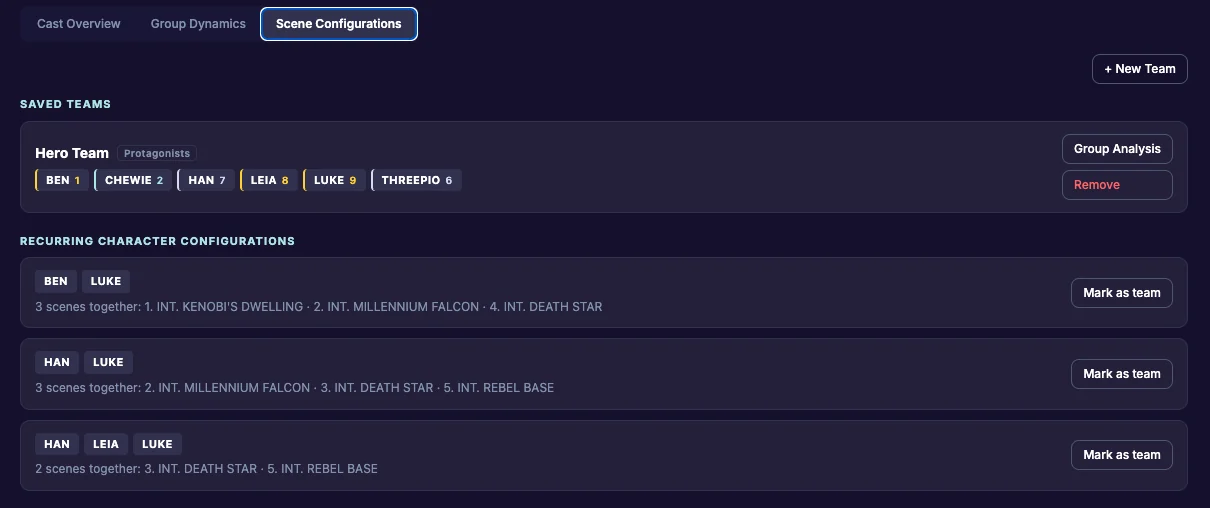
Some groups of characters keep ending up in scenes together: the crew, the family, the gang. Scene Configurations finds those groups for you. Save one as a team, mark it as protagonists or antagonists, and Group Analysis shows how that team holds up under pressure.
Open it
Click Characters, then the Scene Configurations tab.
Recurring Character Configurations
The app looks at who is in every scene: everyone who speaks, and everyone who has a key. Any group that shares 2 or more scenes shows up under Recurring Character Configurations, with how many scenes they share and which ones. A smaller group is hidden only when it never appears without the bigger group.
If nothing shows yet, record scenes with at least 2 speaking characters.
Save a group as a team
- Under Recurring Character Configurations, find the group and click Mark as team.
- Type a name for the team.
- Choose which side the team is on: Protagonists, Antagonists or Neither.
- Click Save.
The group is now marked “saved” and appears under Saved Teams.
Make a team yourself
You can also build a team that the app hasn’t found, for example characters who haven’t shared a scene yet.
- Click + New Team.
- Type a team name.
- Choose Protagonists, Antagonists or Neither.
- Pick at least 2 characters.
- Click Save Team.
Protagonists and antagonists
A team’s name can’t tell the app whose side it is on; a villains’ gang might simply be called “Cobra”. So each team has a side. You can change it at any time on the team’s page. When one saved team is Protagonists and another is Antagonists, Group Analysis compares them member by member. See Team patterns.
A team’s page
Under Saved Teams, click Group Analysis on a team. (The button shows once 2 or more members have a type.) The team’s page shows:
- the members, with their types. Tap a member to open their Full Profile.
- the side switch: Protagonists, Antagonists or Neither.
- the lens switch: Enneagram or INTJ-style.
- Group Psychology: the team patterns first, then the groups this team falls into.
- Pairings Within the Team: every pair inside the team, explained.
Click ← Back to Scene Configurations to return.
Remove a team
Click Remove on the team under Saved Teams, then confirm. This removes the team only; the characters stay in your cast.
